Create new SYS/BIOS project for D.Module2.C6657: Difference between revisions
No edit summary |
No edit summary |
||
| (9 intermediate revisions by the same user not shown) | |||
| Line 23: | Line 23: | ||
|style="width: 500px;"| | |style="width: 500px;"| | ||
[[File:new_project_dialog.jpg|thumb|500px]] | [[File:new_project_dialog.jpg|thumb|500px|link=]] | ||
|} | |} | ||
| Line 35: | Line 35: | ||
Check the Platform drop-down list for keyword 'dm2c6657'. If it is missing continue with the next step, else jump to [[#Platform dm2c6657 or dm2c6657_1|2.6 Platform dm2c6657 or dm2c6657_1]] | Check the Platform drop-down list for keyword 'dm2c6657'. If it is missing continue with the next step, else jump to [[#Platform dm2c6657 or dm2c6657_1|2.6 Platform dm2c6657 or dm2c6657_1]] | ||
|style="width: 500px;"| | |style="width: 500px;"| | ||
[[File:RTCS_Configuration_settings.jpg|thumb|500px]] | [[File:RTCS_Configuration_settings.jpg|thumb|500px|link=]] | ||
|} | |} | ||
{{Absatz}} | {{Absatz}} | ||
| Line 50: | Line 50: | ||
<br /><br /><br /><br /><br /><br /><br /><br /><br /><br />Press OK | <br /><br /><br /><br /><br /><br /><br /><br /><br /><br />Press OK | ||
|style="width: 500px;"| | |style="width: 500px;"| | ||
[[File:add_product_or_repository.jpg|thumb|500px]] | [[File:add_product_or_repository.jpg|thumb|500px|link=]] | ||
|} | |} | ||
{{Absatz}} | {{Absatz}} | ||
| Line 62: | Line 62: | ||
<br /><br /><br /><br /><br /><br /><br /><br /><br /><br /><br /><br /><br /><br /><br />Activate the DM2C6657 entry (if not yet activated) and try again to select a platform | <br /><br /><br /><br /><br /><br /><br /><br /><br /><br /><br /><br /><br /><br /><br />Activate the DM2C6657 entry (if not yet activated) and try again to select a platform | ||
|style="width: 500px;"| | |style="width: 500px;"| | ||
[[File:other_repositories.jpg|thumb|500px]] | [[File:other_repositories.jpg|thumb|500px|link=]] | ||
|} | |} | ||
{{Absatz}} | {{Absatz}} | ||
| Line 75: | Line 75: | ||
<br /><br /><pre style="color:red">dm2c6657</pre> for CPU core 0 and <pre style="color:red">dm2c6657_1</pre> for CPU core 1. | <br /><br /><pre style="color:red">dm2c6657</pre> for CPU core 0 and <pre style="color:red">dm2c6657_1</pre> for CPU core 1. | ||
|style="width: 500px;"| | |style="width: 500px;"| | ||
[[File:platform_dm2c6657.jpg|thumb|500px]] | [[File:platform_dm2c6657.jpg|thumb|500px|link=]] | ||
|} | |} | ||
{{Absatz}} | {{Absatz}} | ||
| Line 82: | Line 82: | ||
<br /><br /><br /><br /><br /><br /><br /><br /><br /><br /><br /><br /><br /><br /><br /><br /><br /><br /><br /><br /><br /><br /><br /><br />Select the desired platform and finish the create new project process | <br /><br /><br /><br /><br /><br /><br /><br /><br /><br /><br /><br /><br /><br /><br /><br /><br /><br /><br /><br /><br /><br /><br /><br />Select the desired platform and finish the create new project process | ||
|style="width: 500px;"| | |style="width: 500px;"| | ||
[[File:finish_new_project.jpg|thumb|500px]] | [[File:finish_new_project.jpg|thumb|500px|link=]] | ||
|} | |} | ||
| Line 95: | Line 95: | ||
|style="width: 500px;"| | |style="width: 500px;"| | ||
[[File:empty_project.jpg|thumb|500px]] | [[File:empty_project.jpg|thumb|500px|link=]] | ||
|} | |} | ||
{{Absatz}} | {{Absatz}} | ||
| Line 101: | Line 101: | ||
{{pagetop}} | {{pagetop}} | ||
=== Add SYS/BIOS configuration === | === Add SYS/BIOS configuration === | ||
{| | {| | ||
| Line 106: | Line 107: | ||
To add a blank SYS/BIOS configuration to your empty project, choose from menu "File->New->RTSC Configuration File" | To add a blank SYS/BIOS configuration to your empty project, choose from menu "File->New->RTSC Configuration File" | ||
|style="width: 500px;"| | |style="width: 500px;"| | ||
[[File:8.new_configuration_file.jpg|thumb|500px]] | [[File:8.new_configuration_file.jpg|thumb|500px|link=]] | ||
|} | |} | ||
{{Absatz}} | {{Absatz}} | ||
| Line 114: | Line 115: | ||
<br /><br /><br /><br /><br /><br />Enter a file name and press "Finish" | <br /><br /><br /><br /><br /><br />Enter a file name and press "Finish" | ||
|style="width: 500px;"| | |style="width: 500px;"| | ||
[[File:9.new_configuration_file2.jpg|thumb|500px]] | [[File:9.new_configuration_file2.jpg|thumb|500px|link=]] | ||
|} | |} | ||
{{Absatz}} | {{Absatz}} | ||
| Line 124: | Line 125: | ||
Activate "Add SYS/BIOS to my configuration" | Activate "Add SYS/BIOS to my configuration" | ||
|style="width: 500px;"| | |style="width: 500px;"| | ||
[[File:10.add_sysbios_support.jpg|thumb|500px]] | [[File:10.add_sysbios_support.jpg|thumb|500px|link=]] | ||
|} | |} | ||
{{Absatz}} | {{Absatz}} | ||
| Line 137: | Line 138: | ||
Now add some source code: | Now add some source code: | ||
|style="width: 500px;"| | |style="width: 500px;"| | ||
[[File:11.add_source_code.jpg|thumb|500px]] | [[File:11.add_source_code.jpg|thumb|500px|link=]] | ||
|} | |} | ||
{{Absatz}} | {{Absatz}} | ||
| Line 145: | Line 146: | ||
Choose the RTSC 'Hello World' main template and finish | Choose the RTSC 'Hello World' main template and finish | ||
|style="width: 500px;"| | |style="width: 500px;"| | ||
[[File:12.add_source_code2.jpg|thumb|500px]] | [[File:12.add_source_code2.jpg|thumb|500px|link=]] | ||
|} | |} | ||
{{Absatz}} | {{Absatz}} | ||
| Line 155: | Line 156: | ||
Hit the hammer butten to initiate a new build process. | Hit the hammer butten to initiate a new build process. | ||
[[File:13.finish_creating_project.jpg]] | [[File:13.finish_creating_project.jpg|link=]] | ||
{{pagetop}} | {{pagetop}} | ||
== Additional Tags == | == Additional Tags == | ||
Latest revision as of 09:18, 19 September 2017
Problem
SYS/BIOS based projects require the correct platform setting for D.Module2.C6657. Even after adding the discovery path under CCS RTSC preferences no suitable platform is available for project settings.
Solution
Use this short guide to create a new SYS/BIOS based project:
Pre Condition
Check your required SYS/BIOS version and choose the recommended XDCTools version:
http://downloads.ti.com/dsps/dsps_public_sw/sdo_sb/targetcontent/rtsc/
New Project
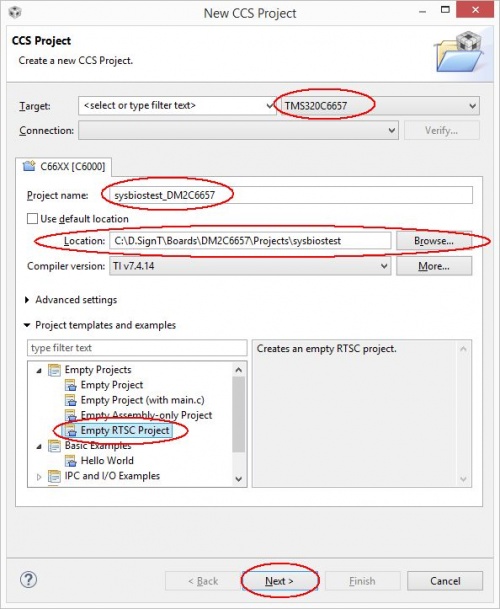
Press Alt+Shift+N or menu File->New and select New CCS Project
|
|

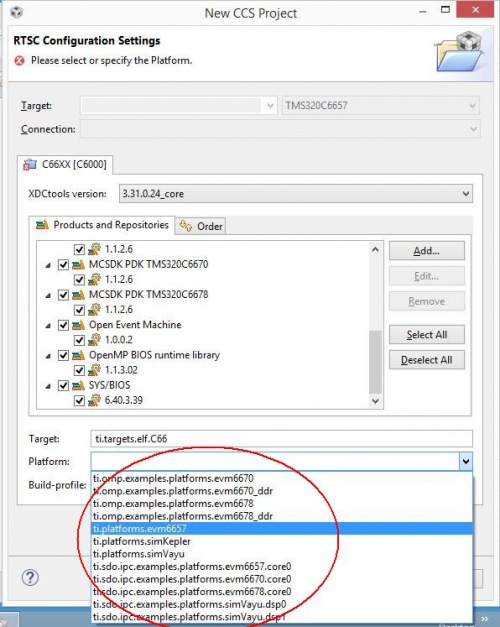
RTSC Configuration Settings
|
Check the Platform drop-down list for keyword 'dm2c6657'. If it is missing continue with the next step, else jump to 2.6 Platform dm2c6657 or dm2c6657_1 |
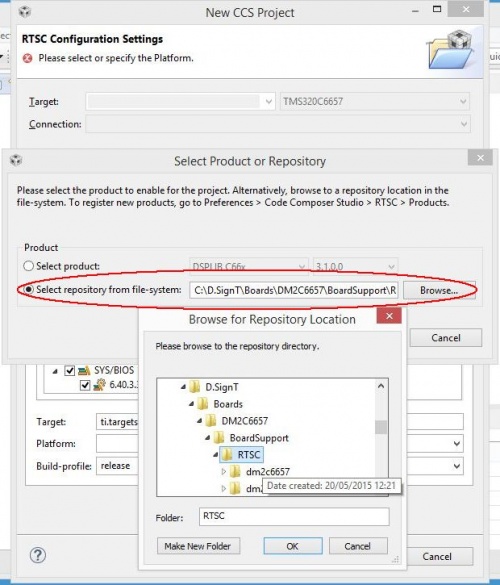
Add Product or Repository
Choose "Add" next to "Products and Repository".
|
|
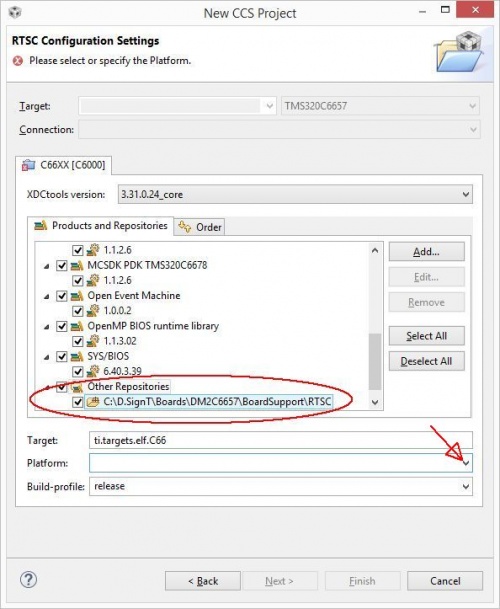
Other Repositories
The RTSC Configuration Settings dialog should contain a new product "Other Repositories".
|
|
Platform dm2c6657 or dm2c6657_1
|
This time two new platforms should appear in the drop-down list (if not try to refresh the list by clicking on the XDCTools version - 3.31.0.24_core in the image) dm2c6657for CPU core 0 and dm2c6657_1for CPU core 1. |
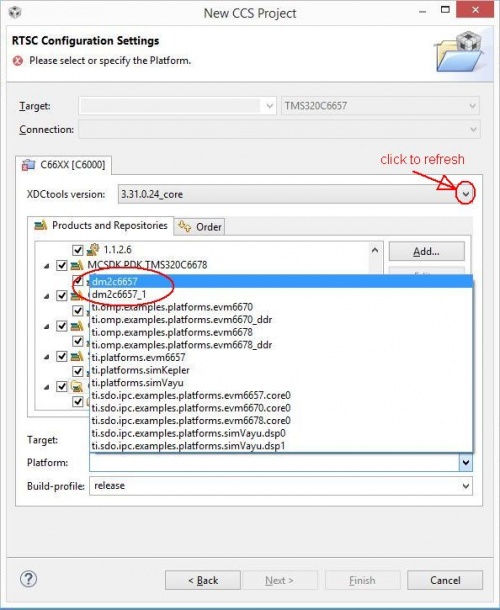
|
|
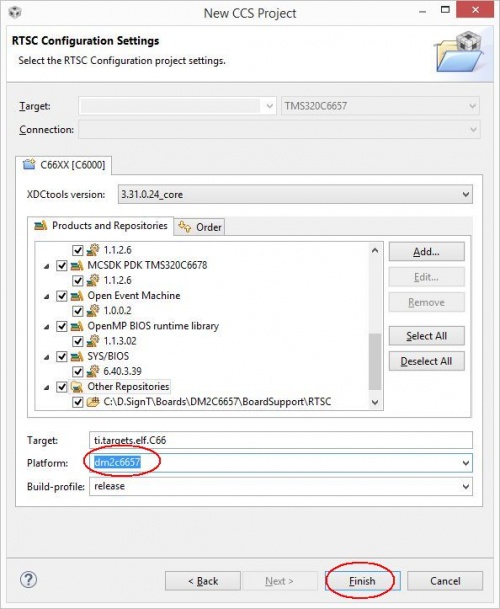
Empty Project
|
You should now have an empty SYS/BIOS project. |
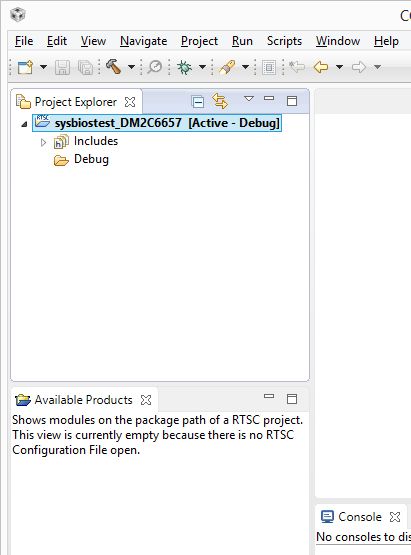
Add SYS/BIOS configuration
|
To add a blank SYS/BIOS configuration to your empty project, choose from menu "File->New->RTSC Configuration File" |
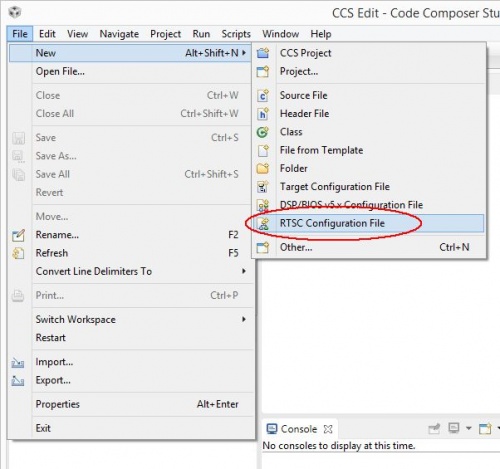
|
|
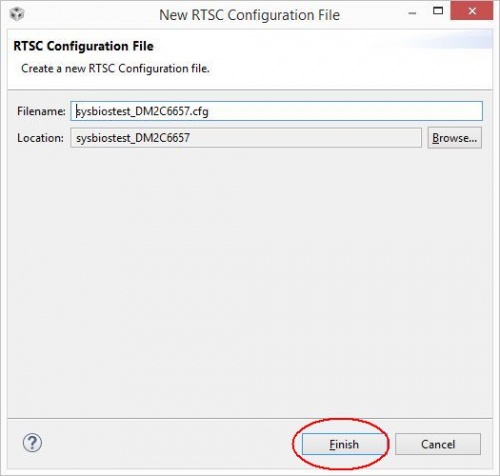
|
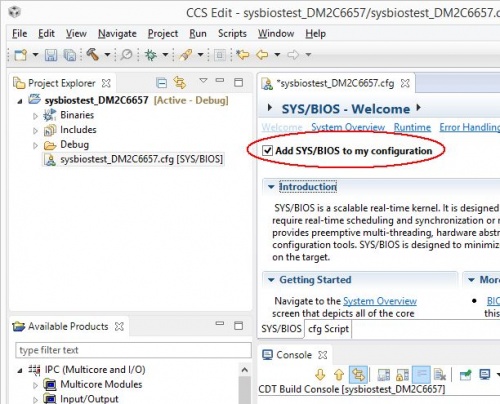
Double click on the SYS/BIOS configuration file. Activate "Add SYS/BIOS to my configuration" |
Add Source Code
|
Now add some source code: |
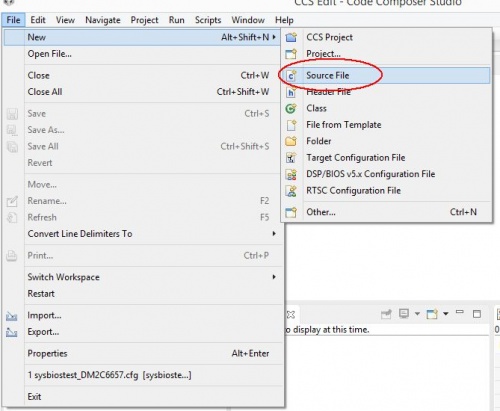
|
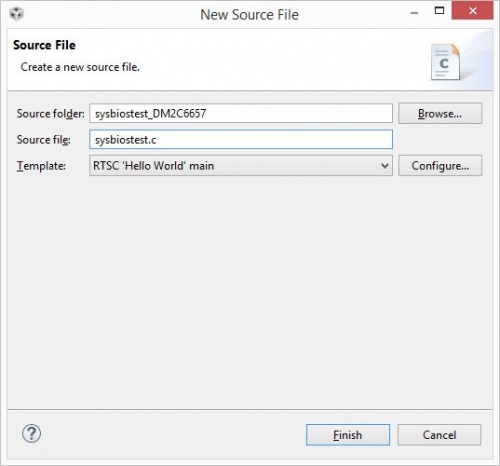
Choose the RTSC 'Hello World' main template and finish |
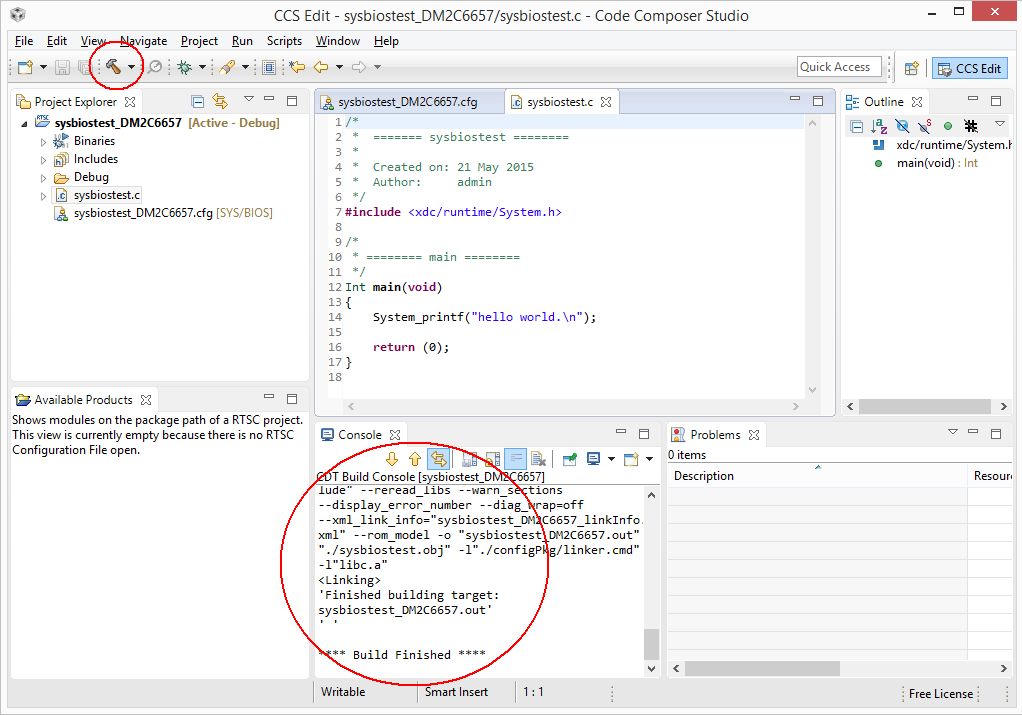
Finally build project
Hit the hammer butten to initiate a new build process.
Additional Tags
Contact  Support


